Examples
1. Hosting Use Case
In this example, assume our “virtual” company runs a Hosting Business.
The company’s customer data, including a) Internet Domains and b) DNS Hostnames, should be manageable by different subsystems.
This example demonstrates the integration with PostgreSQL database transactions, showcasing how the microesb framework handles atomic operations across multiple related entities while maintaining data integrity through commit/rollback mechanisms.
Note
Example number 1 will only cover Local Service Mapping without Python Application Server encapsulation.
Note
In example number 4, we will explore these aspects further, including Service Scaling, Load Balancing and Service Authentication.
1.1. Basic OOP Relations
The hosting service allows customers to buy (add, delete) domains and manage their domains’ DNS host entries (add, update, delete).
- Customer
  + Domain(s)
    + Hostname(s)
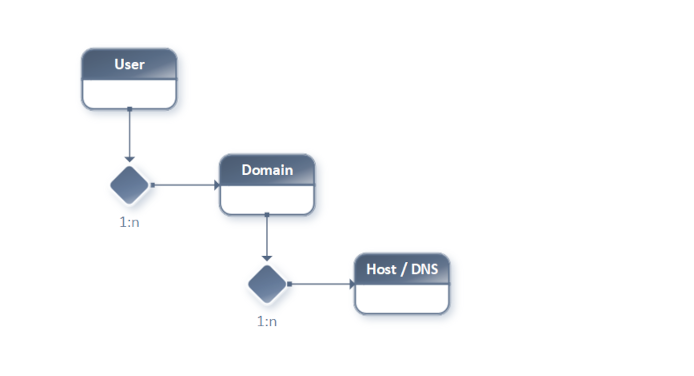
Customer has a 1:n relation to Domain.
Domain has a 1:n relation to Host.
1.2. Relations Diagram
1.3. Encapsulation / Domain Data
A common design approach is to encapsulate each logical segment into a single, separate “flat” service endpoint.
Separated (parametrized) insertDomain
Separated (parametrized) updateDomain
Separated (parametrized) deleteDomain
Separated (parametrized) insertHost
Separated (parametrized) updateHost
Separated (parametrized) deleteHost
Think of these as simple, parametrized function calls—“flat,” non-hierarchical.
1.4. Encapsulation: The Better Way
This can be simplified to preserve database transactions and reduce administrative overhead. By processing structured hierarchical metadata in the service input, these endpoints can be reduced to:
Separated (hierarchical metadata) insertUserDomain
Separated (hierarchical metadata) updateUserDomain
Separated (hierarchical metadata) deleteUserDomain
Note
The microesb service processing can handle multiple (list-based) user requests containing domain/host data in a single web service call.
Note
Example number 1 only covers insertUserDomain.
1.5. Example Call Meta-Data
The following example service call metadata instructs the backend to perform these tasks based on the backend configuration in section 1.7. Backend Config / Service Mapping and code in section 1.8. Python Implementation:
Loop on User [“testuser1”].
Start a database transaction.
Get the user ID by username.
Insert the domain “testdomain1.com” if it does not exist.
Insert a Hostname (MX type) with value “mx01.mailserver.com” and priority 1.
Insert a Hostname (A type) with value “mx01.mailserver.com” and TTL of 36,000 seconds.
Commit on success or roll back the database transaction on failure.
 1service_metadata = {
 2    'SYSServiceID': 'insertUserDomain',
 3    'data': [
 4        {
 5            'User':
 6            {
 7                'SYSServiceMethod': 'init',
 8                'name': 'testuser1',
 9                'Domain': {
10                    'SYSServiceMethod': 'add',
11                    'name': 'testdomain1',
12                    'ending': 'com',
13                    'Host': [
14                        {
15                            'SYSServiceMethod': 'add',
16                            'type': 'MX',
17                            'value': 'mx01.mailserver.com',
18                            'priority': 1
19                        },
20                        {
21                            'SYSServiceMethod': 'add',
22                            'name': 'host1',
23                            'type': 'A',
24                            'value': '5.44.111.165',
25                            'ttl': 36000
26                        }
27                    ]
28                }
29            }
30        }
31    ]
32}
1.6. Database Tables (PostgreSQL)
The following database tables are used in this example:
sys_core.”user”
sys_core.”domain”
sys_dns.”dnsrecord”
Below is an excerpt of the SQL script for creating these tables:
 1\connect "hosting-example"
 2
 3-- Table: sys_core.user
 4CREATE TABLE IF NOT EXISTS sys_core."user"
 5(
 6    id bigint NOT NULL DEFAULT nextval('sys_core.user_id_seq'::regclass),
 7    name character varying NOT NULL,
 8    CONSTRAINT user_pkey PRIMARY KEY (id)
 9);
10
11-- Table: sys_core.domain
12CREATE TABLE IF NOT EXISTS sys_core."domain"
13(
14    id bigint NOT NULL DEFAULT nextval('sys_core.domain_id_seq'::regclass),
15    name text NOT NULL,
16    ending character varying,
17    creator_user_id bigint NOT NULL,
18    CONSTRAINT domain_pkey PRIMARY KEY (id),
19    CONSTRAINT admin_user_id_fk FOREIGN KEY (creator_user_id)
20        REFERENCES sys_core."user" (id) MATCH FULL
21        ON UPDATE NO ACTION
22        ON DELETE CASCADE
23);
24
25-- Table: sys_dns.dnsrecord
26CREATE TABLE IF NOT EXISTS sys_dns."dnsrecord"
27(
28    id integer NOT NULL DEFAULT nextval('sys_dns.dnsrecord_id_seq'::regclass),
29    domain_id integer NOT NULL,
30    name character varying(255) NULL,
31    type character varying(10) NOT NULL,
32    content character varying(65535) NOT NULL,
33    ttl integer,
34    prio integer,
35    CONSTRAINT dnsrecord_pkey PRIMARY KEY (id),
36    CONSTRAINT domain_id_fk FOREIGN KEY (domain_id)
37        REFERENCES sys_core.domain (id) MATCH SIMPLE
38        ON UPDATE NO ACTION
39        ON DELETE CASCADE,
40    CONSTRAINT c_lowercase_name CHECK (name::text = lower(name::text))
41);
1.7. Backend Config / Service Mapping
The following dictionary describes how to configure the microesb backend to run this example.
1.7.1. Service Property Mapping
 1service_properties = {
 2    'User': {
 3        'properties': {
 4            'name': {
 5                'type': 'str',
 6                'default': None,
 7                'required': True,
 8                'description': 'Textual UserID'
 9            },
10            'dbcon': {
11                'type': 'classref',
12                'default': None,
13                'required': True,
14                'description': 'Database Connection Ref'
15            }
16        },
17        'methods': ['init']
18    },
19    'Domain': {
20        'properties': {
21            'name': {
22                'type': 'str',
23                'default': None,
24                'required': True,
25                'description': 'Domain Name'
26            },
27            'ending': {
28                'type': 'str',
29                'default': None,
30                'required': True,
31                'description': 'Domain Ending'
32            }
33        },
34        'methods': ['add', 'delete']
35    },
36    'Host': {
37        'properties': {
38            'name': {
39                'type': 'str',
40                'default': None,
41                'required': False,
42                'description': 'DNS Name'
43            },
44            'type': {
45                'type': 'str',
46                'default': None,
47                'required': True,
48                'description': 'DNS Type'
49            },
50            'value': {
51                'type': 'str',
52                'default': None,
53                'required': True,
54                'description': 'DNS Value'
55            },
56            'ttl': {
57                'type': 'int',
58                'default': 3600,
59                'required': False,
60                'description': 'DNS Time To Live'
61            },
62            'priority': {
63                'type': 'int',
64                'default': None,
65                'required': False,
66                'description': 'MX Type Priority'
67            }
68        },
69        'methods': ['add', 'update', 'delete']
70    }
71}
1.7.2. Hierarchical Class Reference
 1class_reference = {
 2    'User': {
 3        'property_ref': 'User',
 4        'children': {
 5            'Domain': {
 6                'property_ref': 'Domain',
 7                'children': {
 8                    'Host': {
 9                        'property_ref': 'Host'
10                    }
11                }
12            }
13        }
14    }
15}
1.7.3. Class Mapping
1class_mapping = {
2    'User': 'User',
3    'Domain': 'Domain',
4    'Host': 'Host'
5}
1.8. Python Implementation
The following Python code demonstrates the implementation.
1.8.1. Class Definition
  1import psycopg2
  2
  3from microesb import microesb
  4
  5
  6class User(microesb.ClassHandler):
  7
  8    def __init__(self):
  9        super().__init__()
 10        self.DB_user_id = None
 11
 12    def init(self):
 13        with self.dbcon.cursor() as crs:
 14            crs.execute("""
 15                SELECT id
 16                    FROM sys_core."user"
 17                WHERE
 18                    "name" = %s""",
 19                (self.name,)
 20            )
 21            row = crs.fetchone()
 22            self.DB_user_id = row[0]
 23
 24
 25class Domain(microesb.ClassHandler):
 26
 27    def __init__(self):
 28        super().__init__()
 29        self.DB_domain_id = None
 30
 31    def add(self):
 32
 33        self.DB_user_id = self.parent_object.DB_user_id
 34        self.dbcon = self.parent_object.dbcon
 35        print("DB_user_id:{} name:{} ending:{}".format(
 36            self.DB_user_id, self.name, self.ending)
 37        )
 38
 39        print("Insert Domain")
 40
 41        with self.dbcon.cursor() as crs:
 42            crs.execute(
 43                """
 44                SELECT id
 45                    FROM sys_core."domain"
 46                WHERE
 47                    creator_user_id = %s AND "name" = %s AND ending = %s""",
 48                (self.DB_user_id, self.name, self.ending,)
 49            )
 50            try:
 51                row = crs.fetchone()
 52                self.DB_domain_id = row[0]
 53            except Exception as e:
 54                pass
 55
 56        print("DB_domain_id:{}".format(self.DB_domain_id))
 57
 58        with self.dbcon.cursor() as crs:
 59            crs.execute(
 60                """
 61                INSERT INTO sys_core."domain"
 62                    (creator_user_id, "name", ending)
 63                VALUES
 64                    (%s, %s, %s)
 65                ON CONFLICT (creator_user_id, "name", ending) DO NOTHING
 66                RETURNING id
 67                """,
 68                (self.DB_user_id, self.name, self.ending)
 69            )
 70            try:
 71                row = crs.fetchone()
 72                self.DB_domain_id = row[0]
 73            except Exception as e:
 74                pass
 75
 76
 77class Host(microesb.MultiClassHandler):
 78
 79    def __init__(self):
 80        super().__init__()
 81        self.name = None
 82        self.priority = None
 83        self.ttl = None
 84
 85    def add(self):
 86        self.dbcon = self.parent_object.dbcon
 87        self.DB_user_id = self.parent_object.DB_user_id
 88        self.DB_domain_id = self.parent_object.DB_domain_id
 89
 90        print("Host add() called")
 91
 92        print("DB_user_id:{} DB_domain_id:{}".format(
 93            self.DB_user_id, self.DB_domain_id)
 94        )
 95
 96        try:
 97            with self.dbcon.cursor() as crs:
 98                crs.execute(
 99                    """
100                    INSERT INTO sys_dns."dnsrecord"
101                        (domain_id, "name", "type", content, ttl, prio)
102                    VALUES
103                        (%s, %s, %s, %s, %s, %s)""",
104                    (
105                        self.DB_domain_id,
106                        self.name,
107                        self.type,
108                        self.value,
109                        self.ttl,
110                        self.priority
111                    )
112                )
113        except Exception as e:
114            print("Insert excetion:{}".format(e))
1.8.2. Main / Service Call
 1import psycopg2
 2
 3from microesb import microesb
 4
 5from service_properties import service_properties
 6from class_reference import class_reference
 7from class_mapping import class_mapping
 8from service_call_metadata import service_metadata
 9
10
11class_mapper = microesb.ClassMapper(
12    class_references=class_reference,
13    class_mappings=class_mapping,
14    class_properties=service_properties
15)
16
17try:
18    dbcon = psycopg2.connect("dbname='hosting-example' user='postgres' host='localdb'")
19    dbcon.autocommit = False
20except Exception as e:
21    print('DB connection error: {}'.format(e))
22    exit(0)
23
24service_metadata['data'][0]['User']['dbcon'] = dbcon
25
26try:
27    microesb.ServiceExecuter().execute(
28        class_mapper=class_mapper,
29        service_data=service_metadata
30    )
31except Exception as e:
32    print('Service execution error: {}'.format(e))
33
34try:
35    dbcon.commit()
36    dbcon.close()
37except Exception as e:
38    print('DB close error: {}'.format(e))
1.8.3. Passing Parameters
To enable database transactions (disabled autocommit), open the database connection in main.py and pass it into the implementation code.
In service_properties.py (lines 10–15), define the property with ID dbcon to pass the database connection.
'dbcon': {
    'type': 'classref',
    'default': None,
    'required': True,
    'description': 'Database Connection Ref'
}
In main.py (line 24), set the dbcon value in the service call metadata dictionary.
service_metadata['data'][0]['User']['dbcon'] = dbcon
1.8.4. Execute Example
Navigate to the example directory and execute the main.py file.
python3 ./main.py
1.8.5. Post-Execution
After execution, the newly created domain will be in the sys_core.”domain” table, with two related host records in the sys_dns.”dnsrecord” table.
Note
There are no unique constraints preventing duplicate DNS entries. Running the script multiple times will result in duplicate records.
2. PKI Provisioning / Class Types
This example demonstrates PKI (Public Key Infrastructure) certificate provisioning with a focus on class type hierarchies and NoSQL MongoDB backend integration.
Unlike Example 1’s relational database approach, this example showcases how the microesb framework seamlessly integrates with document-based NoSQL databases. MongoDB is used for storing and retrieving certificate metadata, demonstrating the framework’s flexibility in handling both traditional and modern database paradigms.
The example implements a complete certificate generation workflow for:
Certificate Authority (CA) certificates
Server certificates
Client certificates
Each certificate type can optionally use Hardware Security Module (HSM) / Smartcard integration for secure key pair generation. The implementation uses user-defined routing functions to interact with MongoDB for certificate storage and retrieval operations.
2.0.1. MongoDB Collections
The example uses two MongoDB collections within the microesb database:
cert - Stores certificate properties as flat key/value pairs for basic certificate metadata
cert_hierarchy - Contains complete hierarchical JSON data representing the full certificate object graph including relationships to CA, Server, and Smartcard entities
The cert collection is used for simple queries by certificate ID, while cert_hierarchy stores the complete object hierarchy for complex certificate relationships and dependency tracking.
2.0.2. MongoDB Collection Examples
The following examples illustrate the structure of documents stored in the cert and cert_hierarchy collections.
CA Certificate (Flat Storage):
{
  "_id": {
    "$oid": "695e5b5c65ceda39b9c5388e"
  },
  "id": "test-ca1",
  "country": "DE",
  "state": "Berlin",
  "locality": "Berlin",
  "org": "WEBcodeX",
  "org_unit": "Security",
  "common_name": "testca@domain.com",
  "email": "pki@webcodex.de",
  "valid_days": 365,
  "generation_timestamp": "2026-01-07T14:10:52.927127",
  "cert_data": "dummy_cacert_data"
}
CA Certificate (Hierarchical Storage with Smartcard):
{
  "_id": {
    "$oid": "695e5b5c65ceda39b9c5388f"
  },
  "id": "test-ca1",
  "country": "DE",
  "state": "Berlin",
  "locality": "Berlin",
  "org": "WEBcodeX",
  "org_unit": "Security",
  "common_name": "testca@domain.com",
  "email": "pki@webcodex.de",
  "valid_days": 365,
  "generation_timestamp": "2026-01-07T14:10:52.927127",
  "cert_data": "dummy_cacert_data",
  "SmartcardContainer": null,
  "Smartcard": {
    "label": "smartcard_ca_card",
    "user_pin": "pin1",
    "gen_status": true,
    "SmartcardContainer": {
      "label": "keypair_ca1"
    }
  }
}
Server Certificate (Flat Storage):
{
  "_id": {
    "$oid": "695e5b69bfa5128f5c1890f2"
  },
  "id": "test-server1",
  "country": "DE",
  "state": "Berlin",
  "locality": "Berlin",
  "org": "WEBcodeX",
  "org_unit": "Security",
  "common_name": "testserver@domain.com",
  "email": "pki@webcodex.de",
  "valid_days": 365,
  "generation_timestamp": "2026-01-07T14:11:05.030076",
  "cert_data": "dummy_servercert_data"
}
Server Certificate (Hierarchical Storage with CA Reference):
{
  "_id": {
    "$oid": "695e5b69bfa5128f5c1890f3"
  },
  "id": "test-server1",
  "country": "DE",
  "state": "Berlin",
  "locality": "Berlin",
  "org": "WEBcodeX",
  "org_unit": "Security",
  "common_name": "testserver@domain.com",
  "email": "pki@webcodex.de",
  "valid_days": 365,
  "generation_timestamp": "2026-01-07T14:11:05.030076",
  "cert_data": "dummy_servercert_data",
  "SmartcardContainer": null,
  "Smartcard": {
    "label": "smartcard_customer1",
    "user_pin": "pin2",
    "gen_status": true,
    "SmartcardContainer": {
      "label": "testserver1_keypair"
    }
  },
  "CertCA": {
    "id": "test-ca1",
    "country": "DE",
    "state": "Berlin",
    "locality": "Berlin",
    "org": "WEBcodeX",
    "org_unit": "Security",
    "common_name": "testca@domain.com",
    "email": "pki@webcodex.de",
    "valid_days": 365,
    "generation_timestamp": "2026-01-07T14:10:52.927127",
    "cert_data": "dummy_cacert_data",
    "SmartcardContainer": null,
    "Smartcard": {
      "label": null,
      "user_pin": null,
      "gen_status": false,
      "SmartcardContainer": {
        "label": null
      }
    }
  }
}
Client Certificate (Flat Storage):
{
  "_id": {
    "$oid": "695e5b81fa0258fe59b9461d"
  },
  "id": "test-client1",
  "country": "DE",
  "state": "Berlin",
  "locality": "Berlin",
  "org": "WEBcodeX",
  "org_unit": "Security",
  "common_name": "testclient1@domain.com",
  "email": "pki@webcodex.de",
  "valid_days": 365,
  "generation_timestamp": "2026-01-07T14:11:29.750133",
  "cert_data": "dummy_clientcert_data"
}
Client Certificate (Hierarchical Storage with Full References):
{
  "_id": {
    "$oid": "695e5b81fa0258fe59b9461e"
  },
  "id": "test-client1",
  "country": "DE",
  "state": "Berlin",
  "locality": "Berlin",
  "org": "WEBcodeX",
  "org_unit": "Security",
  "common_name": "testclient1@domain.com",
  "email": "pki@webcodex.de",
  "valid_days": 365,
  "generation_timestamp": "2026-01-07T14:11:29.750133",
  "cert_data": "dummy_clientcert_data",
  "SmartcardContainer": null,
  "Smartcard": {
    "label": "smartcard_customer1",
    "user_pin": "pin2",
    "gen_status": true,
    "SmartcardContainer": {
      "label": "testserver1_client1_keypair"
    }
  },
  "CertCA": {
    "id": "test-ca1",
    "country": "DE",
    "state": "Berlin",
    "locality": "Berlin",
    "org": "WEBcodeX",
    "org_unit": "Security",
    "common_name": "testca@domain.com",
    "email": "pki@webcodex.de",
    "valid_days": 365,
    "generation_timestamp": "2026-01-07T14:10:52.927127",
    "cert_data": "dummy_cacert_data",
    "SmartcardContainer": null,
    "Smartcard": {
      "label": null,
      "user_pin": null,
      "gen_status": false,
      "SmartcardContainer": {
        "label": null
      }
    }
  },
  "CertServer": {
    "id": "test-server1",
    "country": "DE",
    "state": "Berlin",
    "locality": "Berlin",
    "org": "WEBcodeX",
    "org_unit": "Security",
    "common_name": "testserver@domain.com",
    "email": "pki@webcodex.de",
    "valid_days": 365,
    "generation_timestamp": "2026-01-07T14:11:05.030076",
    "cert_data": "dummy_servercert_data",
    "SmartcardContainer": null,
    "Smartcard": {
      "label": null,
      "user_pin": null,
      "gen_status": false,
      "SmartcardContainer": {
        "label": null
      }
    }
  }
}
These examples demonstrate how the microesb framework stores both flat certificate data and hierarchical relationships in MongoDB, enabling efficient querying and complete object graph reconstruction.
2.1. CA Certificate Relations
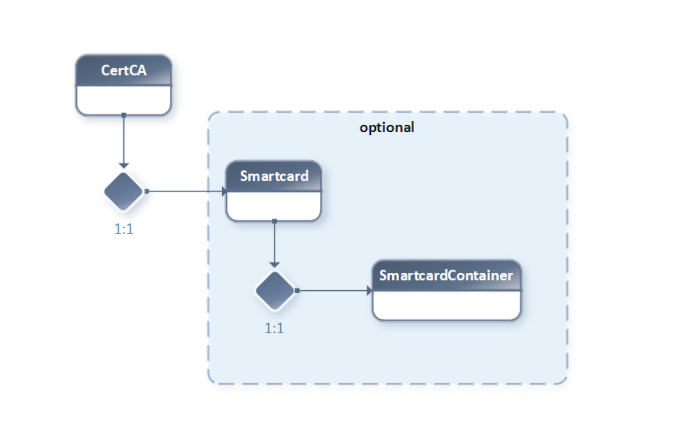
CA == Certificate Authority
HSM == Hardware Security Module / Smartcard
A CA is the root of a PKI (Public Key Infrastructure).
A functioning CA needs a CA Certificate signed by a unique Private Key (stored on a protected HSM or generated via software).
If no Smartcard / SmartcardContainer reference is provided, the Private Key used for the CA certificate will be generated by OpenSSL (marked optional in the diagram).
Note
A CA can also be set up hierarchically (chain). This is called an Intermediate CA. Our example only covers root CA processing without chaining.
2.2. Server Certificate Relations

When a Server Certificate is generated, a CA Certificate and its Private Key are required to ensure that the Server Certificate is issued by the correct CA.
To run a TLS-based server, the following components are needed: - The Server Certificate (including the Public Key) - The Server Certificate’s Private Key - The CA Certificate or CA Certificate Chain (if Intermediate CA is used)
Note
The X.509 v3 Extensions (OIDs) of a certificate define its exact usage (e.g., Email Encryption, Transport Layer Encryption, etc.).
2.3. Client Certificate Relations
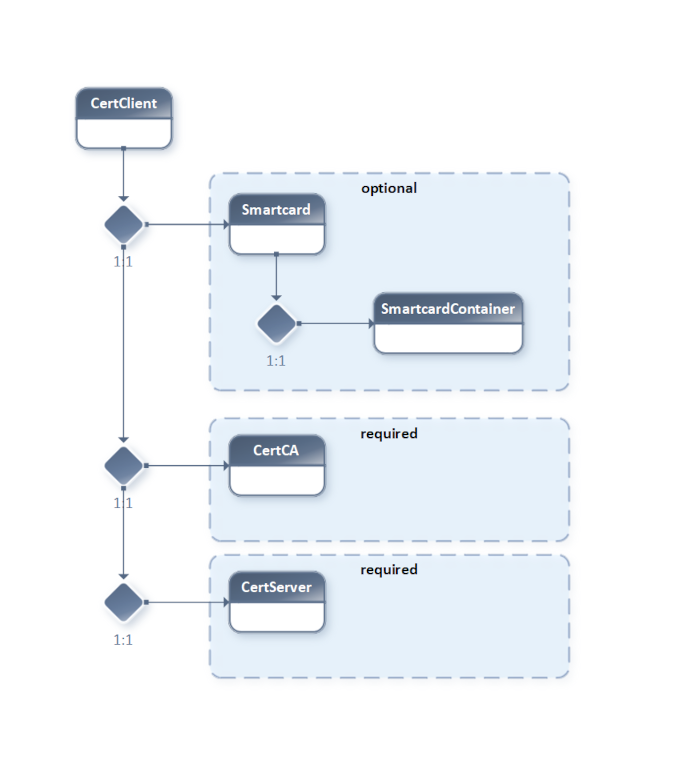
To generate a Client Certificate, in addition to the CA Certificate and its Private Key, the relevant Server Certificate and its Private Key are also required.
2.4. Service Workflow
This example implements a Service Workflow for Certificate Generation for: - CertCA - CertServer - CertClient
For all Certificate Types, the workflow checks if a Smartcard reference is provided: - If yes, the keypair is generated on the card. - If no, the Private Key is generated using OpenSSL.
If a Smartcard is referenced in the Service Call Metadata, related data is selected from the database. After successful Certificate Generation, relevant data is stored in the database.
Note
To emphasize the workflow presentation, only dummy routines/methods and print() statements have been used for illustration.
2.5. Implementation
  1import abc
  2import logging
  3import datetime
  4
  5from microesb import microesb
  6
  7logger = logging.getLogger(__name__)
  8
  9
 10class Cert(microesb.ClassHandler, metaclass=abc.ABCMeta):
 11
 12    def __init__(self):
 13        super().__init__()
 14
 15        self.register_property(
 16            'generation_timestamp',
 17            {
 18                'type': 'str',
 19                'default': None,
 20                'required': False,
 21                'description': 'SysInternal Certificate Generation Date'
 22            }
 23        )
 24
 25        self.register_property(
 26            'cert_data',
 27            {
 28                'type': 'str',
 29                'default': None,
 30                'required': False,
 31                'description': 'SysInternal Generated Certificate Base64 encoded'
 32            }
 33        )
 34
 35    @abc.abstractmethod
 36    def _load_ref_cert_data(self):
 37        """ Abstract _load_ref_cert_data() method.
 38        """
 39
 40    @abc.abstractmethod
 41    def _gen_openssl_cert(self):
 42        """ Abstract _gen_openssl_cert() method.
 43        """
 44
 45    @abc.abstractmethod
 46    def _store_cert_data(self):
 47        """ Abstract _store_cert_data() method.
 48        """
 49
 50    def gen_cert(self):
 51
 52        self._load_ref_cert_data()
 53
 54        if getattr(self, 'Smartcard') is not None:
 55            logger.info('Gen HSM Keypair')
 56            self._hsm_gen_keypair()
 57        if getattr(self, 'Smartcard') is None:
 58            logger.info('Gen OpenSSL PrivKey')
 59            self._gen_openssl_privkey()
 60
 61        self._gen_openssl_cert()
 62        self.generation_timestamp = datetime.datetime.now().isoformat('T')
 63        self._store_cert_data()
 64
 65    def _gen_openssl_privkey(self):
 66        logger.info('Gen openssl private key.')
 67
 68    def _get_cert_data_by_id(self):
 69        logger.info('Get cert data from ESB. Type:{}.'.format(self.type))
 70        self.set_properties(
 71            self._ServiceRouter.send('CertGetById', metadata=self.id)
 72        )
 73
 74    def _hsm_gen_keypair(self):
 75        logger.info('Smartcard container label:{}'.format(
 76            self.Smartcard.SmartcardContainer.label)
 77        )
 78        self.Smartcard.gen_keypair()
 79
 80    def _store_cert_data(self):
 81        logger.info('Store {} cert metadata.'.format(self.type))
 82        self._ServiceRouter.send('CertStore', metadata=self.property_dict)
 83
 84
 85class CertCA(Cert):
 86
 87    def __init__(self):
 88        self.type = 'ca'
 89        super().__init__()
 90
 91    def _load_ref_cert_data(self):
 92        pass
 93
 94    def _gen_openssl_cert(self):
 95        logger.info('Generating {} cert.'.format(self.type))
 96
 97        srv_metadata = {
 98            "CertCA": self.property_dict
 99        }
100
101        self.cert_data = 'dummy_cacert_data'
102        logger.info('Generating cert with metadata:{}'.format(srv_metadata))
103
104
105class CertServer(Cert):
106
107    def __init__(self):
108        self.type = 'server'
109        super().__init__()
110
111    def _load_ref_cert_data(self):
112        self.CertCA._get_cert_data_by_id()
113
114    def _gen_openssl_cert(self):
115        logger.info('Generating {} cert.'.format(self.type))
116
117        srv_metadata = {
118            "CertServer": self.property_dict,
119            "CertCA": self.CertCA.property_dict
120        }
121
122        logger.info('Generating cert with metadata:{}'.format(srv_metadata))
123
124        self.cert_data = 'dummy_servercert_data'
125
126
127class CertClient(Cert):
128
129    def __init__(self):
130        self.type = 'client'
131        super().__init__()
132
133    def _load_ref_cert_data(self):
134        self.CertCA._get_cert_data_by_id()
135        self.CertServer._get_cert_data_by_id()
136
137    def _gen_openssl_cert(self):
138        logger.info('Generating {} cert.'.format(self.type))
139
140        srv_metadata = {
141            "CertClient": self.property_dict,
142            "CertServer": self.CertServer.property_dict,
143            "CertCA": self.CertCA.property_dict
144        }
145
146        logger.info('Generating cert with metadata:{}'.format(srv_metadata))
147        self.cert_data = 'dummy_clientcert_data'
148
149
150class Smartcard(microesb.ClassHandler):
151
152    def __init__(self):
153        super().__init__()
154
155        self.register_property(
156            'gen_status',
157            {
158                'type': bool,
159                'default': False,
160                'required': False,
161                'description': 'SysInternal Generated Smartcard Keypair Status'
162            }
163        )
164
165    def gen_keypair(self):
166        logger.info('Gen keypair on smartcard:{} with keypair label:{}'.format(
167            self.label,
168            self.SmartcardContainer.label
169        ))
170
171        srv_metadata = {
172            "SmartcardID": self.label,
173            "SmartcardContainerLabel": self.SmartcardContainer.label
174        }
175
176        self.gen_status = self._ServiceRouter.send('KeypairGenerate', metadata=srv_metadata)
177
178
179class SmartcardContainer(microesb.ClassHandler):
180
181    def __init__(self):
182        super().__init__()
2.6. Clean OOP Model
To achieve a clean OOP model in the implementation class hierarchy, the following design aspects are used:
Note
Virtual Class Types require a Base Class inheriting microesb.ClassHandler and at least one Child Class inheriting the Base Class.
import abc

class Cert(microesb.ClassHandler, metaclass=abc.ABCMeta):

    def __init__(self):
        super().__init__()
class CertCA(Cert):

    def __init__(self):
        self.type = 'ca'
        super().__init__()
2.6.1. Abstract Methods
The “Cert” base class provides three private abstract methods because the processing logic differs for each Certificate Type:
_load_ref_cert_data()
_gen_openssl_cert()
_store_cert_data()
class CertCA(Cert):

    def _load_ref_cert_data(self):
        pass
class CertServer(Cert):

    def _load_ref_cert_data(self):
        self.CertCA._get_cert_data_by_id()
class CertClient(Cert):

    def _load_ref_cert_data(self):
        self.CertCA._get_cert_data_by_id()
        self.CertServer._get_cert_data_by_id()
2.6.2. Generic Template Methods
The following methods are generic template methods inherited by each Child Class:
_gen_openssl_privkey()
_get_cert_data_by_id()
_hsm_gen_keypair()
2.7. Accessing Properties
The clean OOP model simplifies access to hierarchical Class Instance Properties.
All Virtual Implementation Class Instances can access their own Smartcard Container’s Label as follows:
self.Smartcard.SmartcardContainer.label
In CertClient and CertServer, it is also possible to access the CertCA’s Smartcard Properties (from Referenced Classes in Class Reference Config) to fill data from the database inside _get_cert_data_by_id():
self.CertCA.Smartcard.SmartcardContainer.label
2.8. Class Import
The Class Import Config must include all Implementation Classes except the Base Class(es).
1import_classes = {
2    'service_implementation': [
3        'CertCA',
4        'CertServer',
5        'CertClient',
6        'Smartcard',
7        'SmartcardContainer'
8    ]
9}
2.9. Service Execution
Currently, the Service Registry feature is unimplemented. Execution is only possible as a single service for each Certificate Type.
2.9.1. CertCA Type
The following implementation demonstrates how to execute a CertCA type service:
 1import sys
 2import logging
 3
 4from microesb import microesb
 5
 6from class_reference import class_reference_ca as class_reference
 7from service_properties import service_properties
 8from class_mapping import class_mapping
 9from service_call_metadata import service_metadata_ca as service_metadata
10
11from pymongo import MongoClient
12
13client = MongoClient('mongodb://127.0.0.1/')
14mongodb = client.get_database('microesb')
15
16
17logging.getLogger().addHandler(
18    logging.StreamHandler(sys.stdout)
19)
20
21logging.getLogger().setLevel(
22    logging.INFO
23)
24
25class_mapper = microesb.ClassMapper(
26    class_references=class_reference,
27    class_mappings=class_mapping,
28    class_properties=service_properties
29)
30
31try:
32    res = microesb.ServiceExecuter().execute_get_hierarchy(
33        class_mapper=class_mapper,
34        service_data=service_metadata
35    )
36except Exception as e:
37    print('Service execution error: {}'.format(e))
38
39root_object = res[0]['CertCA']['object_instance']
40
41mongodb.cert_hierarchy.insert_one(root_object.json_dict)
To execute the script, run:
python3 ./main-ca.py
Expected output:
Gen keypair on smartcard:smartcard_ca_card with keypair label:keypair_ca1
Gen openssl cert type:ca.
Insert cert data type:ca into db.
2.9.2. CertServer Type
The following implementation demonstrates how to execute a CertServer type service:
 1import sys
 2import logging
 3
 4from microesb import microesb
 5
 6from class_reference import class_reference_server as class_reference
 7from service_properties import service_properties
 8from class_mapping import class_mapping
 9from service_call_metadata import service_metadata_server as service_metadata
10
11from pymongo import MongoClient
12
13client = MongoClient('mongodb://127.0.0.1/')
14mongodb = client.get_database('microesb')
15
16
17logging.getLogger().addHandler(
18    logging.StreamHandler(sys.stdout)
19)
20
21logging.getLogger().setLevel(
22    logging.INFO
23)
24
25class_mapper = microesb.ClassMapper(
26    class_references=class_reference,
27    class_mappings=class_mapping,
28    class_properties=service_properties
29)
30
31try:
32    res = microesb.ServiceExecuter().execute_get_hierarchy(
33        class_mapper=class_mapper,
34        service_data=service_metadata
35    )
36except Exception as e:
37    print('Service execution error: {}'.format(e))
38
39root_object = res[0]['CertServer']['object_instance']
40
41mongodb.cert_hierarchy.insert_one(root_object.json_dict)
To execute the script, run:
python3 ./main-server.py
Expected output:
Get cert data from db. Type: ca.
Smartcard container label:testserver1_keypair
Gen keypair on smartcard:smartcard_customer1 with keypair label:testserver1_keypair
Gen openssl cert type:server, rel to CA.
Insert cert data type:server into db.
2.9.3. CertClient Type
The following implementation demonstrates how to execute a CertClient type service:
 1import sys
 2import logging
 3
 4from microesb import microesb
 5
 6from class_reference import class_reference_client as class_reference
 7from service_properties import service_properties
 8from class_mapping import class_mapping
 9from service_call_metadata import service_metadata_client as service_metadata
10
11from pymongo import MongoClient
12
13client = MongoClient('mongodb://127.0.0.1/')
14mongodb = client.get_database('microesb')
15
16
17logging.getLogger().addHandler(
18    logging.StreamHandler(sys.stdout)
19)
20
21logging.getLogger().setLevel(
22    logging.INFO
23)
24
25class_mapper = microesb.ClassMapper(
26    class_references=class_reference,
27    class_mappings=class_mapping,
28    class_properties=service_properties
29)
30
31try:
32    res = microesb.ServiceExecuter().execute_get_hierarchy(
33        class_mapper=class_mapper,
34        service_data=service_metadata
35    )
36except Exception as e:
37    print('Service execution error: {}'.format(e))
38
39root_object = res[0]['CertClient']['object_instance']
40
41mongodb.cert_hierarchy.insert_one(root_object.json_dict)
To execute the script, run:
python3 ./main-client.py
Expected output:
Get cert data from db. Type: ca.
Get cert data from db. Type: server.
Smartcard container label:testserver1_client1_keypair
Gen keypair on smartcard:smartcard_customer1 with keypair label:testserver1_client1_keypair
Gen openssl cert type:client, rel to CA and Server.
Insert cert data type:client into db.
2.10. Class Reference
The root classes CertCA, CertServer, and CertClient must have their property_ref mapped to the ‘Cert’ properties defined in the Service Properties Config.
The following requirements must be met for successful referencing: 1. The Class Reference mapping (property_ref) must map to the Base Class (Cert). 2. The Base Class (Cert) must exist in the Implementation. 3. The Base Class (Cert) must be inherited by Virtual Classes (CertCA, etc.) in the Implementation. 4. Properties in the Service Property Config must be defined for the given Base Class (Cert). 5. The Class Mapping Config must include the Virtual Classes (CertCA, etc.). 6. Virtual Classes (CertCA, etc.) must be referenced in the Import Configuration.
The following is an example of a Class Reference Config containing all three certificate types (CA, Server, and Client):
 1class_reference_ca = {
 2    'CertCA': {
 3        'property_ref': 'Cert',
 4        'children': {
 5            'Smartcard': {
 6                'property_ref': 'Smartcard',
 7                'children': {
 8                    'SmartcardContainer': {
 9                        'property_ref': 'SmartcardContainer'
10                    }
11                }
12            }
13        }
14    }
15}
16
17class_reference_server = {
18    'CertServer': {
19        'property_ref': 'Cert',
20        'children': {
21            'Smartcard': {
22                'property_ref': 'Smartcard',
23                'children': {
24                    'SmartcardContainer': {
25                        'property_ref': 'SmartcardContainer'
26                    }
27                }
28            },
29            'CertCA': {
30                'property_ref': 'Cert',
31                'children': {
32                    'Smartcard': {
33                        'property_ref': 'Smartcard',
34                        'children': {
35                            'SmartcardContainer': {
36                                'property_ref': 'SmartcardContainer'
37                            }
38                        }
39                    }
40                }
41            }
42        }
43    }
44}
45
46class_reference_client = {
47    'CertClient': {
48        'property_ref': 'Cert',
49        'children': {
50            'Smartcard': {
51                'property_ref': 'Smartcard',
52                'children': {
53                    'SmartcardContainer': {
54                        'property_ref': 'SmartcardContainer'
55                    }
56                }
57            },
58            'CertCA': {
59                'property_ref': 'Cert',
60                'children': {
61                    'Smartcard': {
62                        'property_ref': 'Smartcard',
63                        'children': {
64                            'SmartcardContainer': {
65                                'property_ref': 'SmartcardContainer'
66                            }
67                        }
68                    }
69                }
70            },
71            'CertServer': {
72                'property_ref': 'Cert',
73                'children': {
74                    'Smartcard': {
75                        'property_ref': 'Smartcard',
76                        'children': {
77                            'SmartcardContainer': {
78                                'property_ref': 'SmartcardContainer'
79                            }
80                        }
81                    }
82                }
83            }
84        }
85    }
86}
2.11. Class Mapping
The following is an example of the Class Mapping Config:
1class_mapping = {
2    'CertCA': 'CertCA',
3    'CertServer': 'CertServer',
4    'CertClient': 'CertClient',
5    'Smartcard': 'Smartcard',
6    'SmartcardContainer': 'SmartcardContainer'
7}
Note
All Virtual Class Types must reference themselves in the mapping. Only Alias Class Mapping uses non-self-mapping (see 3. Hosting Use Case (Using DBPool)).
2.12. Service Properties
The following is an example of the Service Property Config:
 1service_properties = {
 2    'SYSBackendMethods': [
 3        ('gen_cert', 'on_recursion_finish')
 4    ],
 5    'Cert': {
 6        'properties': {
 7            'id': {
 8                'type': 'str',
 9                'default': None,
10                'required': True,
11                'description': 'Textual cert database id'
12            },
13            'country': {
14                'type': 'str',
15                'default': 'DE',
16                'required': True,
17                'description': 'Certificate country ref'
18            },
19            'state': {
20                'type': 'str',
21                'default': None,
22                'required': True,
23                'description': 'Certificate state ref'
24            },
25            'locality': {
26                'type': 'str',
27                'default': None,
28                'required': True,
29                'description': 'Certificate locality ref'
30            },
31            'org': {
32                'type': 'str',
33                'default': None,
34                'required': True,
35                'description': 'Certificate organization ref'
36            },
37            'org_unit': {
38                'type': 'str',
39                'default': None,
40                'required': True,
41                'description': 'Certificate organization unit ref'
42            },
43            'common_name': {
44                'type': 'str',
45                'default': None,
46                'required': True,
47                'description': 'Certificate common name'
48            },
49            'email': {
50                'type': 'str',
51                'default': None,
52                'required': True,
53                'description': 'Certificate email ref'
54            },
55            'valid_days': {
56                'type': 'int',
57                'default': 365,
58                'required': True,
59                'description': 'Certificate validity range in days'
60            }
61        },
62        'methods': ['gen_cert']
63    },
64    'Smartcard': {
65        'properties': {
66            'label': {
67                'type': 'str',
68                'default': None,
69                'required': True,
70                'description': 'Smartcard textual label'
71            },
72            'user_pin': {
73                'type': 'str',
74                'default': None,
75                'required': True,
76                'description': 'Smartcard pin'
77            }
78        }
79    },
80    'SmartcardContainer': {
81        'properties': {
82            'label': {
83                'type': 'str',
84                'default': None,
85                'required': True,
86                'description': 'Container object on smartcards textual label'
87            }
88        }
89    }
90}
2.13. Service Call Metadata
The following is an example of the Service Call Metadata for all certificate types:
 1service_metadata_ca = {
 2    'SYSServiceID': 'generateCertCA',
 3    'data': [
 4        {
 5            'CertCA': {
 6                'id': 'test-ca1',
 7                'Smartcard': {
 8                    'label': 'smartcard_ca_card',
 9                    'user_pin': 'pin1',
10                    'SmartcardContainer': {
11                        'label': 'keypair_ca1'
12                    }
13                },
14                'country': 'DE',
15                'state': 'Berlin',
16                'locality': 'Berlin',
17                'org': 'WEBcodeX',
18                'org_unit': 'Security',
19                'common_name': 'testca@domain.com',
20                'email': 'pki@webcodex.de',
21                'valid_days': 365
22            }
23        }
24    ]
25}
26
27service_metadata_server = {
28    'SYSServiceID': 'generateCertServer',
29    'data': [
30        {
31            'CertServer': {
32                'id': 'test-server1',
33                'CertCA': {
34                    'id': 'test-ca1'
35                },
36                'Smartcard': {
37                    'label': 'smartcard_customer1',
38                    'user_pin': 'pin2',
39                    'SmartcardContainer': {
40                        'label': 'testserver1_keypair'
41                    }
42                },
43                'country': 'DE',
44                'state': 'Berlin',
45                'locality': 'Berlin',
46                'org': 'WEBcodeX',
47                'org_unit': 'Security',
48                'common_name': 'testserver@domain.com',
49                'email': 'pki@webcodex.de',
50                'valid_days': 365
51            }
52        }
53    ]
54}
55
56service_metadata_client = {
57    'SYSServiceID': 'generateCertClient',
58    'data': [
59        {
60            'CertClient': {
61                'id': 'test-client1',
62                'CertCA': {
63                    'id': 'test-ca1'
64                },
65                'CertServer': {
66                    'id': 'test-server1'
67                },
68                'Smartcard': {
69                    'label': 'smartcard_customer1',
70                    'user_pin': 'pin2',
71                    'SmartcardContainer': {
72                        'label': 'testserver1_client1_keypair'
73                    }
74                },
75                'country': 'DE',
76                'state': 'Berlin',
77                'locality': 'Berlin',
78                'org': 'WEBcodeX',
79                'org_unit': 'Security',
80                'common_name': 'testclient1@domain.com',
81                'email': 'pki@webcodex.de',
82                'valid_days': 365
83            }
84        }
85    ]
86}
3. Hosting Use Case (Using DBPool)
Example number 3 is an exact copy of example number 1 with the difference that a database pooling mechanism python-dbpool is used.
Project information:
4. NLAP Integration
Example number 4 will be added on NLAP (Next Level Application Protocol) completion.
Ongoing project status can be viewed here: